


Manufacturing work instructions are the backbone of consistent and safe production. They guide operators through each task with clear steps, visuals, safety notes, and quality checkpoints, making complex processes easier to execute and repeat. This blog explains what manufacturing work instructions are, how to create them, their utility across the shop floor, and the comparison between paper and digital formats. Also, the process for creating work instructions is illustrated with a real-time example to show what a well-structured instruction looks like in practice.
Navigate to section

Every efficient and safe manufacturing operation relies on one key element: a work instruction guide. This guide includes clear, essential work instructions, even when they are complex.
Work instructions may look simple, but they are more than just a list of steps. They reflect operational quality, skills, experience, and technical knowledge. They also ensure compliance with production quality standards. These instructions are vital for precision, repeatability, and traceability in operations. They allow operators to perform critical tasks reliably, in alignment with the process objectives, while addressing safety concerns.
The article explains what manufacturing work instructions are. It covers how to create them and their link to SOPs (Standard Operating Procedures). It also shows how these instructions make workforce management easier.
What are the Manufacturing Work Instructions?
Manufacturing work instructions are detailed, step-by-step guides created for a specific operation, or task. It navigates operators in a stepwise manner on how to perform a particular activity with operational details. Manufacturing work instructions play a crucial role in ensuring tasks are executed correctly on the production floor.
They typically include:
- Operating parameters and limits
- Required tools and materials
- Specific technical details about the process
- Quality and safety compliance criteria
- Visual aids such as images, diagrams, or increasingly 3D models, videos, and audio prompts
For example, how to calibrate a plastic injection mold, align a cutting machine head, conduct a visual inspection or a stress test, label a finished product, or identify a non-conforming part.
How to Create Manufacturing Work Instructions: Step-by-Step Guide
Creating manufacturing instructions is not something a person can complete; it is a collaborative, often multidisciplinary task that requires in-depth technical understanding. Simply put, creating work instruction will require participation from multiple teams, including engineering, quality, safety, and operations. This ensures that each step is not only precise and safe but also corresponds to the desired objective and uses or follows the best internal, external, or international practices. Let's see the general steps to generate a work instruction:
General Process and Steps for Creating a Work Instruction
Step 1: Process Analysis
Process owners (usually engineers or process experts) must break down the general task or entire process into specific steps, identifying critical parameters, tools, materials, and applicable safety considerations.
Step 2: Standardization
Each step should be documented in actions or groups of related actions within a uniform format, often using templates that commonly include:
- Numbered and sequential step-by-step instructions
- Multimedia visual aids (2D/3D images, photos, diagrams, videos, audio)
- Warnings, safety symbols, and general personal protective equipment (PPE)
- Quality control points and events
- Time-based definitions of compliance (estimated or planned cycle times)
Step 3: Validation and Testing
Once the initial version is complete, the instruction must be evaluated. This ensures clarity, security, and viability. This step is iterative and requires feedback from both the executor and the end user (operators) to improve the document.
Step 4: Physical Configuration or Digital Publication for Use
When the approval process is complete, a final blueprint is created, and a release version must be issued. This can be digital or physical.
Step 5: Approval and Version Control
After the internal validation process, the instruction is approved. It must then be version-controlled to track updates, revisions, and changes. During this step, it is recommended that the instruction be stored in a controlled system (often within an MES, QMS, or similar system).
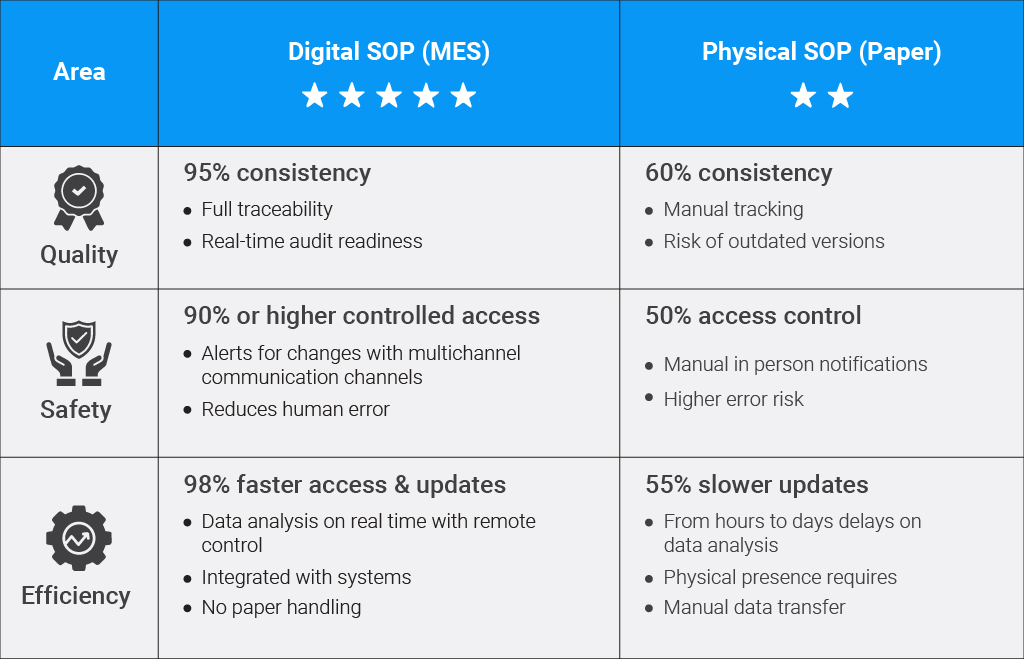
Digital vs Physical SOP's
Advantages and disadvantages of each are listed below.
How Manufacturing Work Instructions are Used on the Shop Floor?
Manufacturing Work Instructions breaks down a complex process into smaller simple steps. Here is how they are used on the shop floor:
Execution Guide for Production Floor Operators
The most common and important uses of work instructions are related to production operations. Instructions are primarily distributed electronically across the production floor to ensure task accuracy and compliance adherence, especially for complex operations.
Initial or Ongoing Training Tool
Work instructions also serve as training aids. New employees use them to practice and learn specific tasks. This helps them perform efficiently and consistently. It reduces learning curves, speeds up onboarding, and minimizes errors.
Quality & Compliance Support
Work instruction manuals help maintain quality assurance during execution. Data traceability enables inspectors and supervisors to ensure processes are followed and results meet specifications. This allows for real-time data management and ongoing monitoring.
Continuous and Dynamic Improvement
The instruction guide is subject to continuous updates as the process evolves. It works for any level of change—whether driven by new regulations, best practices, equipment, or materials. You can distribute updates quickly with just one click.

If your teams rely on paper documents or manual version control, you might see inconsistencies, delays, and errors.
Smart Factory MOM OMS System addresses these issues effectively. It centralizes work instructions, aligns them with your SOPs/eSOPs, and delivers the correct version to operators in real time.
Want to Learn More?
Real-Time Example: Work Instruction for Plastic Injection
Creating manufacturing work instruction is more than just listing steps. It’s about translating a process into a standardized, visual, and safe guide that operators can follow consistently.
To explain how a manufacturing work instruction manual is created and structured, let’s walk through a real-world example of the plastic injection process for electronic components.
From process on the shop floor to instruction draft: How to map a process and define work instruction
Step 1: Process Analysis to Define the Context
Before writing the instructions, the first step is to analyze the process, in this case, the plastic injection process:
- Task/Expected Product: Polypropylene (PP) injection mold / Electronic housing.
- Machine and equipment: Injection press model MM10038 / Shell mold 2201P.
- Production parameters:
- Injection process temperature: 220°C
- Pressure: 80 bar
- Cycle time: 45 seconds
- Additional tools: Thermal gloves, safety goggles.
- Risks: Burns from hot material, pressure points in the mold.
Step 2: Standardization to Structure the Instruction
Once the process is understood, we format the instruction into a clear, repeatable structure. This is where the actual steps are defined. Before transferring to a procedure, the instruction is created in a blueprint. Before being created in Smart Factory MOM or on paper, the instruction is typically displayed in a tabular format like this:
| Step | Description | Recommended Visual Aid | Safety | Quality |
|---|---|---|---|---|
|
1 |
Verify mold is installed and clean from previous production runs. |
Mold image |
Wear gloves and glasses |
Visual cleanliness check |
|
2 |
Check and Load material into hopper. |
Hopper image |
Avoid contact with screw |
Confirm material type |
|
3 |
Set parameters on HMI: 220 °C, 80 bar, 45 s |
HMI screen |
Do not change settings without authorization |
Confirm values |
|
4 |
Start injection cycle needed |
Start button |
Keep hands clear of mold area |
Ensure cycle completes correctly |
|
5 |
Remove part and place in cooling tray |
Tray with part |
Use thermal gloves |
Check for defects (flash, warping) |
Each column serves a purpose:
- Step: Sequential number for clarity.
- Description: What the operator does.
- Recommended Visual Aid: Option recommended to support the steps most effectively.
- Safety: Specific PPE or precautions based on best practices and regulatory norms.
- Quality: What to check to ensure standards are met.
Note: This format is operator-friendly and creates a clear relationship between the topic and the record that needs to be tracked and followed. In digital MES systems, each row can also be displayed as an interactive card or checklist, where the data is tracked in real time.
From Draft to Operational Use: How a Work Instruction Becomes a Real Tool
Once a work instruction has undergone a detailed technical phase, it must be validated and approved before being used in the workshop, making it a document with standardized operational validity.
Step 3: Validation and Testing to Ensure Usability
At this stage, the draft should be evaluated under conditions as realistic as possible, and the following are typically expected:
- Operators perform pilot runs using the generated instructions.
- Data is captured regarding clarity, timeliness, and safety of execution.
- Adjustments are made to visual aids, wording, and the sequence of steps where needed.
This step ensures the instructions are not only theoretically accurate but also practical, safe, and effective during real execution.
Step 4: Approval and Version Control
Once the instruction has been validated and meets the minimum requirements, it is released for creation, dissemination, and use. It may consist of the following steps:
- The instruction is approved by the stakeholders (Process and Safety Engineering and Executing Production)
- A version of code is assigned (e.g., IW-PLAST-001 v1.2)
- A Final blueprint is created
The instruction then moves to the publication and distribution process, meaning it is made available to operators at the applicable points and areas of execution.
From approved version to published on Operational Formats: Selecting from Paper vs. Digital formats
After approval, the format in which the document section will be published, along with the entire definition of the procedure, must be defined. The instruction is (commonly) implemented in one of two formats:
Paper Format
- It is printed on paper and distributed physically to workstations in filing cabinets or folders.
- It requires recurring printing due to damage or changes to versions or information.
- It is used in environments with limited or no digital access.
- It is structured in a tabular format with columns for Step, Description, Image, Security, and Quality.
- It always requires additional formats for traceability of records.
Digital Format (MES Smart Factory MOM)
- Displayed on shop floor tablets or operator displays.
- Dynamic, real-time layout.
- Each step is displayed as an interactive card or OMS with multimedia visual elements that can be interactive.
- Steps typically maintain safety icons and quality controls, all with related traceability and ongoing monitoring.
- Operators can mark steps as completed, report issues, and access support content.
- Monitoring compliance, viewing version history, and approving updates is possible for the entire organization.
- Real-time updates and full remote traceability.
Manufacturing Work Instruction vs Manufacturing SOP
As operational method sheets or manufacturing SOPs outline the broader aspects of the process, manufacturing work instructions narrow the focus to a single operation and provide detailed guidance on performing it correctly, ensuring safety and consistency. The SOP outlines rules, quality needs, and safety standards for a process. In contrast, Work Instructions break these requirements into practical steps for operators. As companies move from paper to digital eSOPs, work Instructions need to change too, to avoid inconsistencies on the shop floor.
Read More: Understand in detail about Manufacturing SOPs and how to create them

SOP's and Their Relevance in Industry 4.0 Era
As manufacturing continues to evolve, work instructions are also transforming within the industry 4.0 era. The shift toward digitalization now requires these instructions to be integrated into intelligent systems such as Manufacturing Execution Systems (MES). On modern shop floors, operators access them through tablets where each action generates real-time traceability across the entire process. This digital environment supports operations that must adapt to variable products, making work instructions more dynamic and responsive. The result is better control, improved decision-making, and significant operational and administrative advantages.
Why are Manufacturing Work Instructions Important for Efficient Production?
Ultimately, manufacturing work instructions are far more than simple step lists; they are essential tools that ensure consistency, quality, safety, and efficiency in an increasingly connected, data-driven production environment.
How Manufacturing Work Instructions Simplify Operation
- Process Standardization: They define the sequence and scope of action to reduce variability by standardizing operational steps and applying best practices, resulting in a more consistent and standardized process.
- Quality Improvement: Increase quality KPIs by reducing errors and defects, as execution becomes consistent, adhering to clear and well-defined operational guidelines.
- Improved Overall Safety: When applied correctly in operations, they support and enforce safety standards (PPE requirements and safety protocols) for the protection of workers during operations.
- On-the-Job and Ongoing Training: It can be used both for training new staff and for training in new areas, as it allows for rapid adaptation to new processes, enabling rapid onboarding and reducing learning curves for new staff.
Manufacturing Execution with MES-Integrated Digital Work Instructions
Modern manufacturing environments increasingly require appropriate, up-to-date solutions to support processes that previously relied on traditional means. Execution is an area that is becoming increasingly demanding, requiring solutions that integrate work instructions into digital platforms such as MES (Manufacturing Execution Systems). This need arises from the benefits obtained, such as:
- Dynamic visualization based on product or order
- Real-time updates and version control
- Integrated multimedia for better understanding
- Operator feedback loops for improvement
- Continuous traceability and complete remote control of the operation in real time
Smart Factory MOM makes production easier for manufacturing units. It streamlines operations from execution to product delivery. Remove the hassle of juggling between paper-based documents with Smart Factory MOM.
They are detailed documents that typically outline and define, in an organized manner through instructions and sections, the most efficient and safe way to perform a specific task or group of tasks correctly. Their correct use (typically) ensures a reduction in errors, operational consistency, and improved regulatory compliance.
Some common errors include:
- Lack of onsite document availability (complex or inadequate layout or damaged document).
- Use of incomprehensible, vague, or ambiguous technical language.
- Lack of explanatory or understandable elements (lack of visual aids).
- Outdated or unreviewed content.
- Lack of information (ignoring comments from operators and supervisors).
- Lack of alignment with current shop floor practices, best practices, or both.
Five basic categories of manufacturing process are:
- Casting and molding: Forming materials using molds or cores, based on the insertion of a filling material into cavities.
- Machining: Extraction of base material by mechanical methods to shape parts and products.
- Joining: Forming a single body of two or more components through a process such as soldering, tinning, or welding.
- Forming: Altering the body of a material by bending or reshaping materials.
- Additive manufacturing: Building parts layer by layer (e.g., plastic 3D printing)
Four key characteristics of good work instructions are:
- Clarity: They should use simple, direct, and easy-to-understand language, avoiding technical jargon and ambiguous ideas.
- Completeness: They should include every step, tool, and condition deemed necessary for the task, without omitting any information or sources.
- Consistency: They should be aligned with current workplace practices, standards, and terminology, as well as international or local standards and best practices.
- Accessibility: They should be available for reference (easy to locate, read, and update), either in physical or digital format (the latter is highly recommended).